facebook
favorite button
super instructor icon
Professeur fiable
Ce professeur a un délai et un taux de réponse très élevé, démontrant un service de qualité et sa fidélité envers ses élèves.
member since icon
Depuis septembre 2023
Professeur depuis septembre 2023
Computer Science Basics including Computer Graphics, Computer Applications
course price icon
Àpd 31.65 C$ /h
arrow icon
Computer Science basics are an important subject for Today's IT era. Information Technology is on its peak, if you want to learn about the basics i.e. Microsoft expert, graphics, Computer Applications and so on please join my class. thank You
Informations supplémentaires
Web cam is not important
Lieu
location type icon
En ligne depuis Pakistan
Présentation
Hello, my name is Sohail and I have a Master's degree in Computer Science. I have been teaching for around 09 years and can assist with all subjects related to computer and information technology. My specialization includes web designing, web development, software engineering, software testing, computer systems, computer applications, and programming. If you are looking to improve your skills and achieve your learning goals, I would highly recommend booking a lesson with me. I am happy to assist you and guide you through the learning process. Let's work together to help you reach your full potential. Thank you.
Education
Master's in Computer Science From University of Engineering & Technology, My specialization includes web designing, web development, software engineering, software testing, computer systems, computer applications, and programming. If you are looking to improve your skills and achieve your learning goals,
Expérience / Qualifications
I have 8 years of teaching experience. i am Microsoft certified. As an aspiring computer science teacher, I feel confident in my ability to impart knowledge to high school students. My aim is to help each student develop their skills in a subject that is increasingly important in our digital world. I believe that interactive learning, discussions, and problem-solving exercises are the most effective methods of teaching. By utilizing various teaching techniques, I can create an environment that is both stimulating and supportive, where students can learn at their own pace and succeed.
Age
Enfants (7-12 ans)
Adolescents (13-17 ans)
Adultes (18-64 ans)
Seniors (65+ ans)
Niveau du Cours
Débutant
Intermédiaire
Avancé
Durée
60 minutes
Enseigné en
anglais
ourdou
persan
Disponibilité semaine type
(GMT -05:00)
New York
at teacher icon
Cours par webcam
Mon
Tue
Wed
Thu
Fri
Sat
Sun
00-04
04-08
08-12
12-16
16-20
20-24
Hello, my name is Sohail and I have a Master's degree in Computer Science. I have been teaching for around 09 years and can assist with all subjects related to computer and information technology. My specialization includes web designing, web development, software engineering, software testing, computer systems, computer applications, and programming. If you are looking to improve your skills and achieve your learning goals, I would highly recommend booking a lesson with me. I am happy to assist you and guide you through the learning process. Let's work together to help you reach your full potential. Thank you.
I have 8 years of teaching experience. i am Microsoft certified. As an aspiring computer science teacher, I feel confident in my ability to impart knowledge to high school students. My aim is to help each student develop their skills in a subject that is increasingly important in our digital world. I believe that interactive learning, discussions, and problem-solving exercises are the most effective methods of teaching. By utilizing various teaching techniques, I can create an environment that is both stimulating and supportive, where students can learn at their own pace and succeed.
I'm passionate about teaching computer science and always encourage my students to ask questions and explore new topics. A positive learning environment is essential for students to thrive, and I strive to create such an environment in my classes. So if you're interested in learning more about computer science, don't hesitate, Let's begin our learning journey together!
Lire la suite
Cours Similaires
arrow icon previousarrow icon next
verified badge
Babacar
PROGRAMME DE LA FORMATION ✔️

I. Excel :
1. Test de niveau pour vérifier les prérequis avant la formation
2. Bonnes pratiques Excel pour mieux gérer vos données collectées
• Gestion des paramètres de listes déroulantes
• Tableaux et plages de données
• Formules de dates
• Fonctions SI, ET et OÙ
3. Formules complexes
• Fonctions de recherche, RechercheV, Index, Equiv, Indirect
• Fonctions statistiques (SOMME.SI.ENS, NB.SI.ENS, etc)
• Automatiser la mise à jour des tableaux de résultats
• Fonctions matricielles (FILTRE, TRIERPAR, UNIQUE, TRANSPOSE, etc)
4. Tableaux de bord interactifs
• Mise en place d’outils de visualisation de données
• Créer l’interactivité avec des boutons d’option, cases à cocher, listes déroulantes
• Partage et diffusion en PDF et/ou via OneDrive, SharePoint
• Coédition des documents partagés
5. Recevez la documentation complète (support de cours et exercices)
6. Tableaux croisés dynamiques
7. Projet concret sur la gestion d’une facture, gestion de stock, gestion client et tableaux de bords
8. Délivrance de l’attestation de formation

II. Word :
1. Présentation du logiciel
2. Saisie de texte
3. Mis en page d’un document
4. Enregistrement
5. Impression d’un document
6. Volet navigation
7. Fonctions Rechercher et Remplacer
8. Insertion d’images
9. Création de tableaux
10. Conversation d’un document pdf
11. Création de cv, lettre de motivation, lettre commerciale....

III. PowerPoint :
1. Orientation du logiciel
2. Création de diapositives
3. Saisie de texte
4. Insertion d’images et de vidéos
5. Mis en page d’un document
6. Animation d’une présentation
7. Création de diaporamas
8. Projet de présentation

IV. Dactylographie :
1. Installation du logiciel
2. Définition
3. Règles de dactylographie
4. Initiation au logiciel de dactylographie
5. Cours et exercices pratiques

N’hésitez pas à nous contacter pour plus d’informations:

#formation #excelavance #packoffice #microsorft #word #powerpoint #dactylographie #excelexpert #bureautique #presentiel #enligne
verified badge
Amin
Give your child a head start in the future by introducing them to Artificial Intelligence in a way that’s fun, simple, and safe.

In this hands-on class, children learn how AI works and how to use tools like ChatGPT to learn faster, think creatively, and solve problems—all through interactive activities, games, and real-life examples designed just for kids.
No technical background needed. Just curiosity and imagination!

🚀 What Your Child Will Learn

✔ What AI is (explained simply) and how it’s used in everyday life
✔ How to talk to AI properly and ask smart questions (prompt skills for kids)
✔ AI for school:
- Understanding lessons better
- Getting help with homework (the right way!)
- Creating summaries and explanations in kid-friendly language

✔ AI for creativity & fun:
- Writing stories, poems, and comics
- Creating images with AI
- Brainstorming ideas for projects and presentations

✔ AI for organization & confidence:
- Planning homework and study time
- Improving writing and communication skills
- Learning how to explain ideas clearly

✔ Safe & responsible AI use:
- Understanding what AI can and can’t do
- Using AI ethically and safely
- Building digital responsibility from an early age

👨‍👩‍👧‍👦 Who This Class Is For
- Children ages 8–14
- Curious kids who love learning and technology
- Students who want extra support with schoolwork
- Creative kids who enjoy writing, drawing, and problem-solving
- No experience required

💡 Why Parents Love This Class
✔ Designed specifically for children
✔ Focuses on learning, creativity, and critical thinking — not shortcuts
✔ Encourages independent thinking, not copying
✔ Builds future-ready skills in a positive and age-appropriate way
✔ Hands-on, engaging, and easy to follow

This is not a boring tech lecture.
Children learn by doing, exploring, and creating—with guidance every step of the way.

🎓 By the End of the Class
- Your child will:
- Feel confident using AI as a learning helper
- Understand how to use technology smartly and responsibly
- Improve school skills, creativity, and organization
- Be excited about learning and the future of technology

👉 A perfect introduction to AI for young minds—turning curiosity into confidence.
Video thumbnail
Play icon
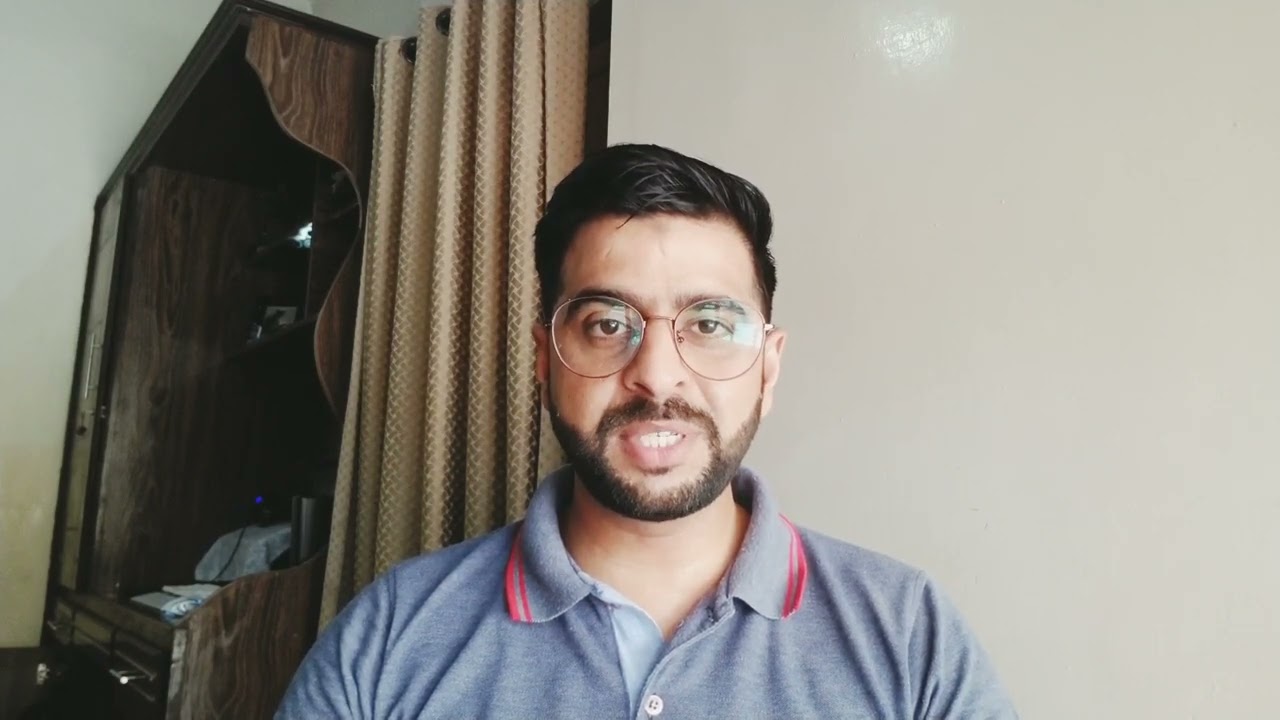
Vidéo de Sohail
message icon
Contacter Sohail
repeat students icon
Le premier cours est couvert par notre Garantie Le-Bon-Prof
Cours Similaires
arrow icon previousarrow icon next
verified badge
Babacar
PROGRAMME DE LA FORMATION ✔️

I. Excel :
1. Test de niveau pour vérifier les prérequis avant la formation
2. Bonnes pratiques Excel pour mieux gérer vos données collectées
• Gestion des paramètres de listes déroulantes
• Tableaux et plages de données
• Formules de dates
• Fonctions SI, ET et OÙ
3. Formules complexes
• Fonctions de recherche, RechercheV, Index, Equiv, Indirect
• Fonctions statistiques (SOMME.SI.ENS, NB.SI.ENS, etc)
• Automatiser la mise à jour des tableaux de résultats
• Fonctions matricielles (FILTRE, TRIERPAR, UNIQUE, TRANSPOSE, etc)
4. Tableaux de bord interactifs
• Mise en place d’outils de visualisation de données
• Créer l’interactivité avec des boutons d’option, cases à cocher, listes déroulantes
• Partage et diffusion en PDF et/ou via OneDrive, SharePoint
• Coédition des documents partagés
5. Recevez la documentation complète (support de cours et exercices)
6. Tableaux croisés dynamiques
7. Projet concret sur la gestion d’une facture, gestion de stock, gestion client et tableaux de bords
8. Délivrance de l’attestation de formation

II. Word :
1. Présentation du logiciel
2. Saisie de texte
3. Mis en page d’un document
4. Enregistrement
5. Impression d’un document
6. Volet navigation
7. Fonctions Rechercher et Remplacer
8. Insertion d’images
9. Création de tableaux
10. Conversation d’un document pdf
11. Création de cv, lettre de motivation, lettre commerciale....

III. PowerPoint :
1. Orientation du logiciel
2. Création de diapositives
3. Saisie de texte
4. Insertion d’images et de vidéos
5. Mis en page d’un document
6. Animation d’une présentation
7. Création de diaporamas
8. Projet de présentation

IV. Dactylographie :
1. Installation du logiciel
2. Définition
3. Règles de dactylographie
4. Initiation au logiciel de dactylographie
5. Cours et exercices pratiques

N’hésitez pas à nous contacter pour plus d’informations:

#formation #excelavance #packoffice #microsorft #word #powerpoint #dactylographie #excelexpert #bureautique #presentiel #enligne
verified badge
Amin
Give your child a head start in the future by introducing them to Artificial Intelligence in a way that’s fun, simple, and safe.

In this hands-on class, children learn how AI works and how to use tools like ChatGPT to learn faster, think creatively, and solve problems—all through interactive activities, games, and real-life examples designed just for kids.
No technical background needed. Just curiosity and imagination!

🚀 What Your Child Will Learn

✔ What AI is (explained simply) and how it’s used in everyday life
✔ How to talk to AI properly and ask smart questions (prompt skills for kids)
✔ AI for school:
- Understanding lessons better
- Getting help with homework (the right way!)
- Creating summaries and explanations in kid-friendly language

✔ AI for creativity & fun:
- Writing stories, poems, and comics
- Creating images with AI
- Brainstorming ideas for projects and presentations

✔ AI for organization & confidence:
- Planning homework and study time
- Improving writing and communication skills
- Learning how to explain ideas clearly

✔ Safe & responsible AI use:
- Understanding what AI can and can’t do
- Using AI ethically and safely
- Building digital responsibility from an early age

👨‍👩‍👧‍👦 Who This Class Is For
- Children ages 8–14
- Curious kids who love learning and technology
- Students who want extra support with schoolwork
- Creative kids who enjoy writing, drawing, and problem-solving
- No experience required

💡 Why Parents Love This Class
✔ Designed specifically for children
✔ Focuses on learning, creativity, and critical thinking — not shortcuts
✔ Encourages independent thinking, not copying
✔ Builds future-ready skills in a positive and age-appropriate way
✔ Hands-on, engaging, and easy to follow

This is not a boring tech lecture.
Children learn by doing, exploring, and creating—with guidance every step of the way.

🎓 By the End of the Class
- Your child will:
- Feel confident using AI as a learning helper
- Understand how to use technology smartly and responsibly
- Improve school skills, creativity, and organization
- Be excited about learning and the future of technology

👉 A perfect introduction to AI for young minds—turning curiosity into confidence.
Garantie Le-Bon-Prof
favorite button
message icon
Contacter Sohail